It happens tens of thousands of times every minute across corporate offices, startups, and home workstations:
A paralegal needs to email a 28MB signed acquisition contract that exceeds email attachment limits. An HR manager has to submit a batch of scanned PAN cards, Aadhaar documents, and bank statements for a PF audit. An accountant is struggling to upload an annual financial balance sheet to an overburdened portal.
In all three cases, they open a browser tab, search "compress PDF free online" or "convert PDF to Word", and drag their sensitive file into an alluring, pastel-colored upload box.
Within five seconds, the file is reduced by 60%, downloaded, and dispatched. The employee breathes a sigh of relief. The task is done.
What they don't realize is that they just committed a critical data breach.
In 2026, with the enforcement of India's Digital Personal Data Protection (DPDP) Act 2023, the EU GDPR, and tightening global enterprise data governance, the casual habit of using free cloud PDF web utilities has become one of the single largest, untracked corporate security vulnerabilities in modern computing.

1. The Dangerous Illusion of "Free" Cloud Tools
When a cloud software tool costs nothing to use, has zero subscription tiers, and serves multi-gigabyte file manipulation capabilities to millions of daily visitors, you must ask the fundamental engineering question: Who is paying for the servers, GPU compute, and petabyte-scale storage bandwidth?
Running headless PDF rendering pipelines (such as Ghostscript, Poppler, LibreOffice headless, and QPDF) at high concurrency requires expensive multi-core Linux server clusters, memory-heavy instances, and high-throughput content delivery networks (CDNs).
Free online conversion websites finance these massive infrastructure operational costs through three primary avenues:
A. Data Monetization & Metadata Scraping
While top-tier cloud tools maintain enterprise compliance, hundreds of clone utility websites explicitly retain file metadata, text layers, embedded contact details, and user IP mapping. This data is scraped, collated, and sold to third-party data broker aggregators for programmatic advertising, credit scoring models, or B2B sales intelligence profiling.
B. Third-Party Tracker Infiltration
Inspect the network waterfall of typical "free PDF" websites in your browser's Developer Tools. You will routinely discover dozens of third-party advertising scripts, Meta Pixels, Google Tag Manager scripts, and ad telemetry trackers executing simultaneously. Many capture document filenames (e.g., Confidential_Q4_Financial_Audit_Reliance_Draft.pdf), session IDs, and geo-coordinates in plaintext HTTP query strings.
C. Training Data Harvesting for Unregulated AI Models
With the voracious appetite of generative AI training pipelines in 2025 and 2026, millions of publicly uploaded PDFs—containing authentic business correspondence, vendor contracts, legal motions, and tax schedules—are quietly indexed and ingested to train document-understanding LLMs without explicit, informed customer consent.
2. Anatomy of a Cloud PDF Leak: What Happens to Your File?
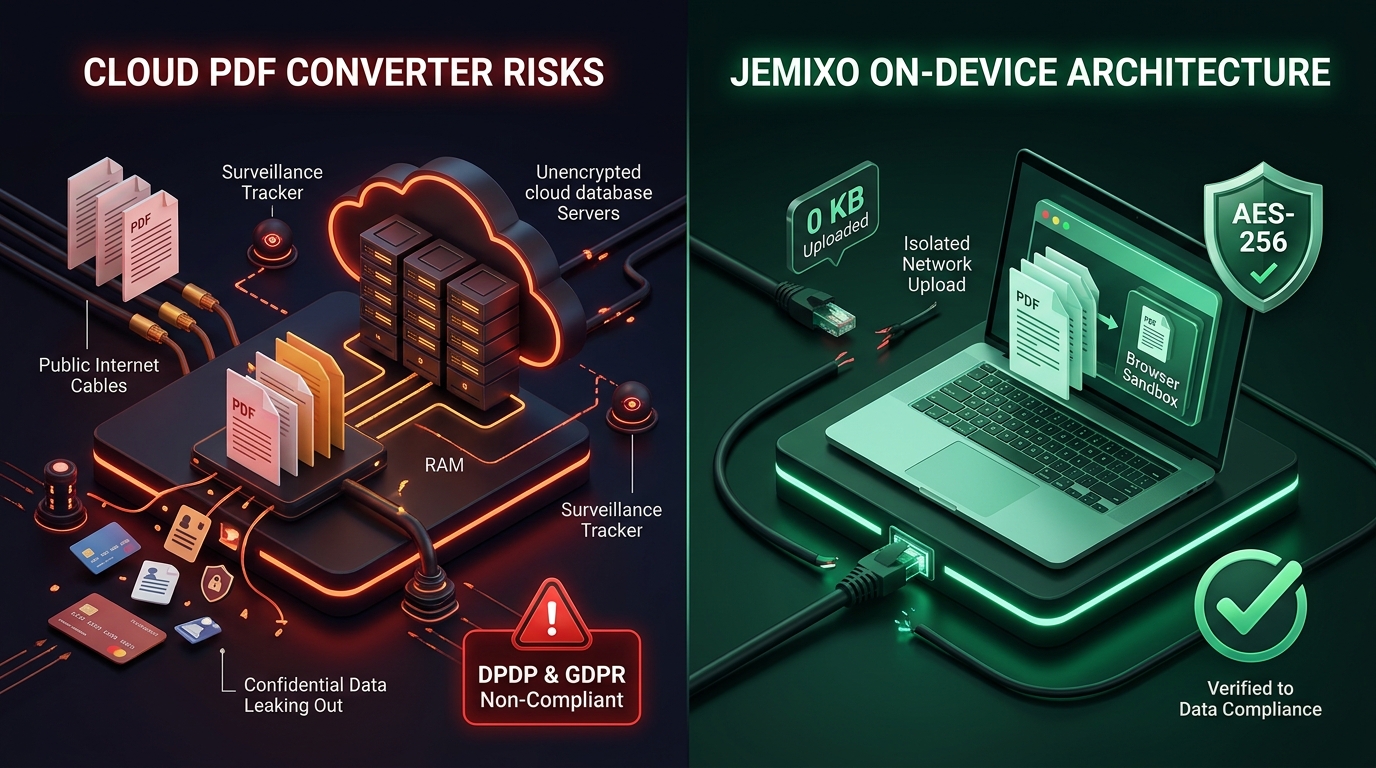
Most users assume that clicking "Compress" or "Convert" is a transient calculation—like a pocket calculator multiplying two numbers. In reality, a traditional cloud PDF converter triggers an extensive, multi-hop remote journey:
graph LR
    A[Your Computer] -->|1. TLS Uplink / Wi-Fi| B[CDN Edge Proxy]
    B -->|2. HTTP POST Ingestion| C[Remote Conversion Server]
    C -->|3. Disk Storage /tmp| D[Headless Ghostscript Engine]
    C -->|4. Async S3 Bucket Backup| E[Cloud Cold Storage]
    C -->|5. HTTP Download Link| A
Here is where the vulnerabilities multiply:
- The Transit Vulnerability: Your file is transmitted over public network infrastructure. While modern HTTPS encrypts data in flight, compromised Wi-Fi networks, malicious corporate proxy certificates, or rogue browser extensions can intercept the raw payload.
- The Server-Side Disk Footprint: Remote servers rarely process files purely in volatile RAM. They write incoming multipart streams to temporary disk paths (e.g.,
/tmp/uploads/uuid-98421.pdf). If server processes crash or log rotation scripts fail, these files remain written to physical non-volatile storage indefinitely. - The "We Delete Your Files in 1 Hour" Fallacy: Even if the application logic runs a cron job to purge the main upload folder every 60 minutes, storage snapshots, automated filesystem backups, server error logs, and multi-region CDN caching layers retain fragmented copies for weeks or months.
- Misconfigured Cloud Buckets: The cybersecurity landscape is littered with high-profile data leaks caused by misconfigured AWS S3 buckets or ElasticSearch clusters left publicly indexable by careless utility website operators. A single bucket leak can expose millions of medical records, identity cards, and non-disclosure agreements to the open web.
3. The 2026 Regulatory Nightmare: DPDP Act 2023 & GDPR Penalties
Uploading business or personal records to random third-party cloud converters is no longer just bad security etiquette—it is illegal under modern data privacy legislation.
India's Digital Personal Data Protection (DPDP) Act 2023
Under India's DPDP Act, any organization handling personal data acts as a Data Fiduciary. The law mandates:
- Section 8(5): A Data Fiduciary must protect personal data in its possession or under its control by taking reasonable security safeguards to prevent personal data breach.
- Section 9: Strict requirements regarding parental consent and children's data.
- Cross-Border Transfer Restrictions: Transmitting Indian citizens' identifiable data to cloud servers located in non-compliant or restricted foreign jurisdictions violates data sovereignty mandates.
The Financial Consequences: Failure to observe reasonable security safeguards under the DPDP Act carries punitive regulatory fines of up to ₹250 Crores ($30 Million USD) per breach.
European Union GDPR (General Data Protection Regulation)
Under GDPR Article 28, transmitting Personally Identifiable Information (PII) to an unvetted third-party converter without an executed Data Processing Agreement (DPA) constitutes an unlawful transfer of personal data. Fines reach up to €20 Million or 4% of total worldwide annual turnover.
If an employee in your finance, human resources, or legal department uploads an employee contract, customer Aadhaar card, or medical reimbursement bill to an uncertified cloud converter, your enterprise is immediately exposed to catastrophic regulatory liability.
4. The Modern Solution: Client-Side, On-Device Processing
Does safeguarding document privacy mean professionals must endure 40MB email bounces or purchase $2,000 enterprise desktop software licenses?
No. The browser itself has become an ultra-fast, zero-trust execution engine.
Thanks to advances in WebAssembly (Wasm), HTML5 Canvas hardware acceleration, and modern JavaScript sandboxing, documents no longer need to be transmitted to remote servers for compression, conversion, or redaction.
How On-Device PDF Processing Works
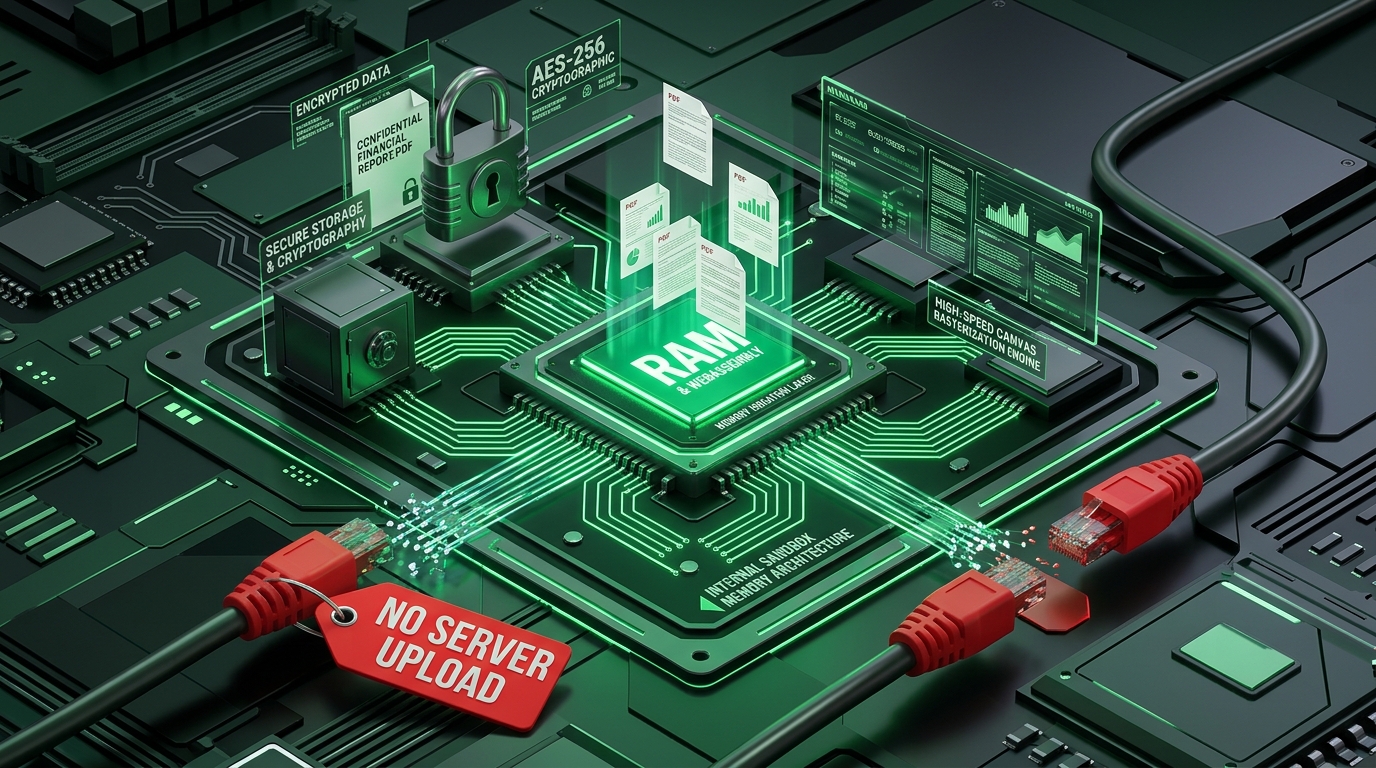
At Jemixo Technologies, our engineering philosophy is built around Local-First Privacy. When you use the Jemixo 100% Private PDF Compressor or our Images to PDF Converter, the entire computational lifecycle is confined strictly to your device's local memory:
graph TD
    UserFile[Your Confidential PDF] -->|Zero Network Upload| LocalRAM[Local Browser Sandbox / RAM]
    LocalRAM -->|Hardware-Accelerated Canvas| Downsampler[Client-Side Rasterization & Resampling]
    Downsampler -->|Lossless In-Memory Assembly| OptimizedPDF[Compressed PDF Output]
    OptimizedPDF -->|Direct Memory Blob| LocalDisk[Instant Local Download]
The Architectural Difference: Cloud vs. Jemixo On-Device
| Architectural Parameter | Traditional Cloud PDF Tools (Smallpdf, iLovePDF, etc.) | Jemixo On-Device Architecture |
|---|---|---|
| Data Transit | File uploaded over Internet via HTTP POST | 0 KB Uploaded (100% in-browser RAM execution) |
| Server Persistence | Cached on remote disks, S3 buckets, and server logs | Zero Server Storage (No backend server involved) |
| Regulatory Compliance | High risk under DPDP Act 2023, GDPR, HIPAA, and SOC-2 | Architectural Compliance (Data never leaves device) |
| Processing Latency | 10s – 45s (Upload time + queue + compute + download) | < 1.5s (Instant local canvas hardware acceleration) |
| Offline Capability | Fails completely without active high-speed internet | 100% Offline & Air-Gap Capable (Works in Airplane Mode) |
| Third-Party Trackers | Heavy ad networks, programmatic tracking pixels | Zero Telemetry (Clean, privacy-first interface) |
5. The 5-Point Security Checklist Before Compressing Any Document
Before you or any member of your team compresses, merges, or converts a business document online, run this 30-second verification audit:
1. Check the Network Tab in DevTools
Press F12 (or Cmd + Option + I on Mac), open the Network tab, and filter by Fetch/XHR. Drag your document into the tool.
- If you see a large
POSTrequest with multipart payload activity streaming megabytes of data to an external URL, your file is being uploaded to a remote server. - If zero network payload is dispatched (as seen on Jemixo Compress PDF), the processing is happening 100% locally on your machine.
2. Test the Airplane Mode Rule
Turn off your Wi-Fi or disconnect your Ethernet cable, then click compress or convert.
- If the tool immediately displays an error message stating "No Internet Connection", it relies entirely on a remote server.
- If the tool flawlessly finishes the compression and offers a download link while offline, it is an authentic client-side engine.
3. Scan the Privacy Policy for Sub-Processors
Search the tool’s privacy terms for keywords like "third-party infrastructure," "cloud analytics," and "data retention." If the provider does not offer a signed Enterprise DPA, assume your uploaded documents are accessible to server administrators.
4. Strip Metadata and Mask Identifiers
If you are ever forced to use an external tool, sanitize the PDF first:
- Remove author names, creation timestamps, and software signatures.
- Black out or mask sensitive PII like Aadhaar numbers, PAN cards, bank account digits, and home addresses using native system preview tools.
5. Standardize on Verified On-Device Utilities
Implement an organization-wide policy restricting unapproved cloud conversion portals at the DNS firewall level. Standardize internal workflows around zero-upload client-side utilities.
6. How Jemixo Technologies Protects Your Digital Life
At Jemixo Technologies, we build software designed for an era where privacy is non-negotiable. Whether you are an individual citizen safeguarding your identity or an enterprise securing proprietary data, our tools deliver uncompromising protection:
📄 Jemixo 100% Private PDF Compressor
Compress heavy PDFs by up to 80% directly in your browser. Engineered with client-side canvas downsampling and dynamic JPEG/WebP compression, your files are processed in local memory and never hit any server. Fast, free, and compliant with DPDP Act standards.
🔐 Jemixo 100% Private PDF Protect & Decrypt
Add bank-grade AES-256 / RC4 password encryption to confidential contracts or unlock password-protected documents entirely inside your browser's RAM sandbox. Zero bytes sent over network wires.
🖼️ Jemixo Images to PDF Converter
Combine multiple JPG, PNG, and WebP receipts, bills, or photo scans into clean, publication-ready PDF documents without uploading a single pixel to the cloud.
🛡️ Jemixo Safe — On-Device Cyber Scam Radar
Our flagship mobile intelligence system scans SMS phishing vectors, malicious APKs, and fraud patterns entirely on your Android smartphone. Zero user data is ever transmitted to remote analytics servers.
Frequently Asked Questions (FAQ)
Are free online PDF converters really keeping copies of my files?
Yes, in many cases. Even services that claim to delete files within an hour store documents on temporary server drives, cloud object buckets, and proxy caches during processing. Furthermore, several low-reputation converter websites explicitly retain document text layers and metadata for ad-targeting networks and model training.
How does client-side PDF compression work without uploading to a server?
Modern web browsers possess powerful JavaScript and WebAssembly runtimes capable of rendering PDF vector pages, extracting embedded bitmaps, and downsampling image resolutions directly using your computer’s CPU and GPU memory. The compressed document is reassembled in local RAM as a Blob and downloaded directly to your hard drive with zero bytes transmitted over the internet.
Does on-device compression ruin document quality or make text unreadable?
No. High-quality client-side compressors allow you to select your preferred compression level (Low, Balanced, High). Vector text layers and fonts remain razor-sharp and searchable, while heavy, unoptimized embedded photos and scans are smartly compressed to standard 150 DPI or 96 DPI web resolutions.
Is uploading customer contracts to cloud tools a violation of the DPDP Act 2023?
Yes. Transmitting personal, financial, or identifiable data to unvetted third-party cloud tools without proper security safeguards and data fiduciary compliance directly exposes your organization to Section 8(5) penalties of up to ₹250 Crores under India's DPDP Act.
Can I use Jemixo PDF tools completely offline?
Yes. Once the web application is loaded in your browser, all compression algorithms run entirely on your local machine. You can disconnect your internet, turn on Airplane Mode, and process your confidential files with complete peace of mind.
Conclusion: Protect Your Data at the Source
Every year, billions of dollars are spent on enterprise firewalls, endpoint security software, and employee cybersecurity training. Yet, all of that protection is bypassed the moment a team member uploads an unencrypted balance sheet to an anonymous "Free PDF" website.
The era of trusting unknown cloud servers with your most confidential contracts, identity cards, and financial records is over. By embracing client-side, on-device processing, you eliminate third-party data liabilities, safeguard your business against catastrophic regulatory fines, and guarantee complete sovereignty over your digital assets.
🔒 Experience 100% Private Document Processing
Try our free, enterprise-grade on-device tools today: